OPENAI · 影像模型指南
GPT Image 2.5
保留創意,細修每一處。
OpenAI 最新推出的影像模型著重於參考圖還原與精準編輯。了解 Flare 和 Sunburst 分別適合哪些創作專案。
比較兩個版本官方公告 · 2026 年 9 月 8 日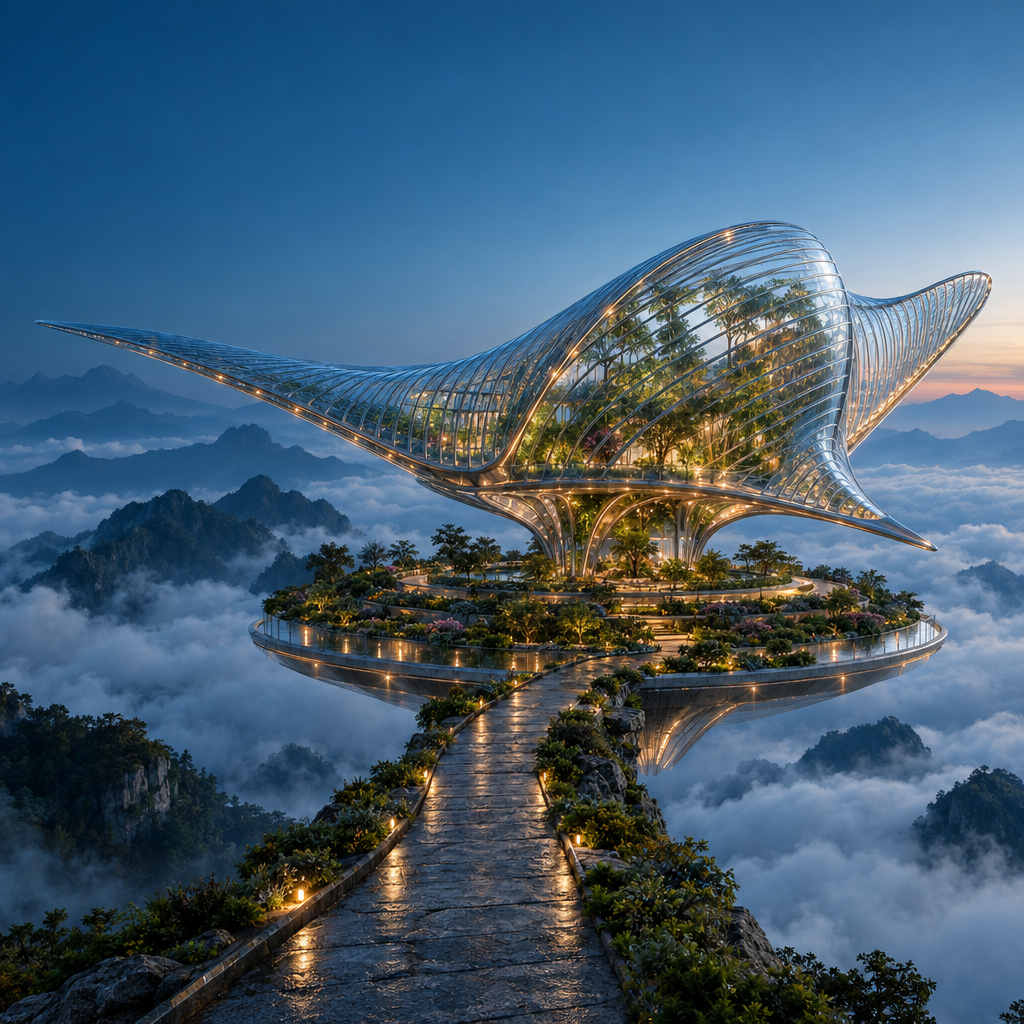
實際生成提示詞
Create a spectacular cinematic architectural photograph of an imaginary floating botanical observatory at blue hour. A single enormous manta-ray-shaped pavilion made from clear ribbed glass and slender polished titanium floats above a circular terraced garden in a sea of clouds. The glass fins curve gracefully, with botanicals visible inside and small warm amber lights following the structural ribs. A narrow stone causeway approaches from the lower foreground; layered mountain silhouettes recede into mist. Precise architectural geometry, believable glass refraction, damp stone microtexture, atmospheric depth and carefully restrained teal-and-amber color grading. Low three-quarter wide-angle view, one unmistakable focal point, ambitious editorial art direction, grand scale, crisp but natural detail. Keep the upper-left corner visually quiet for potential website text. Square composition. No people, no text, no logos, no collage, no split screen, no visible watermark.
本頁為模型指南。GPT Image 2.5 在 Ruxa 的生成能力與價格尚未驗證。工作台按鈕會開啟目前可用的模型選單。
看看提示詞如何成為作品
這些原創圖片使用 GPT Image 2.5 生成,解析度為 1024 × 1024,品質設為 High。查看完整圖片與實際使用的提示詞。
同一份創作要求,兩種詮釋。
Flare 與 Sunburst 使用了相同的海報提示詞、解析度和品質設定。可以比較文字、間距與玻璃反射。這些單次輸出用於呈現差異,不代表模型的整體排名。
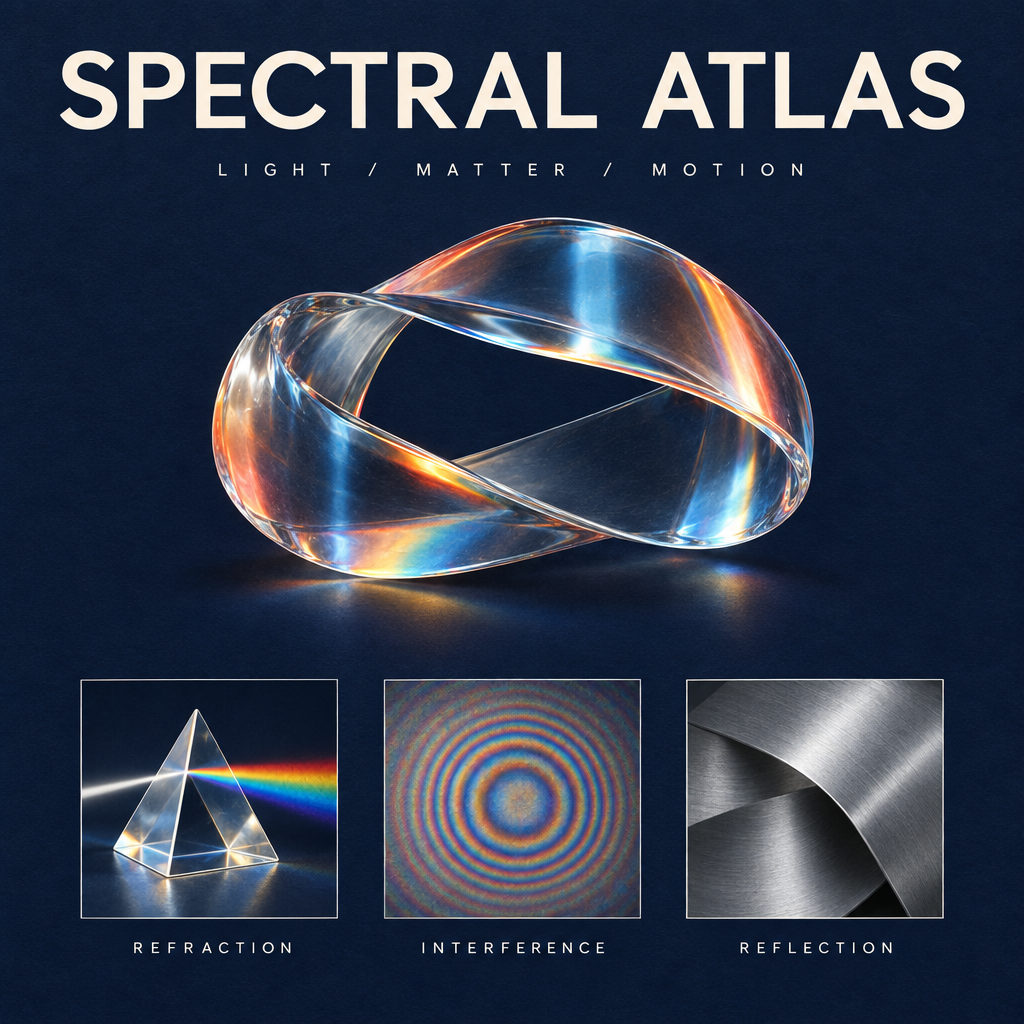
使用 GPT Image 2.5 生成 · 1K · High
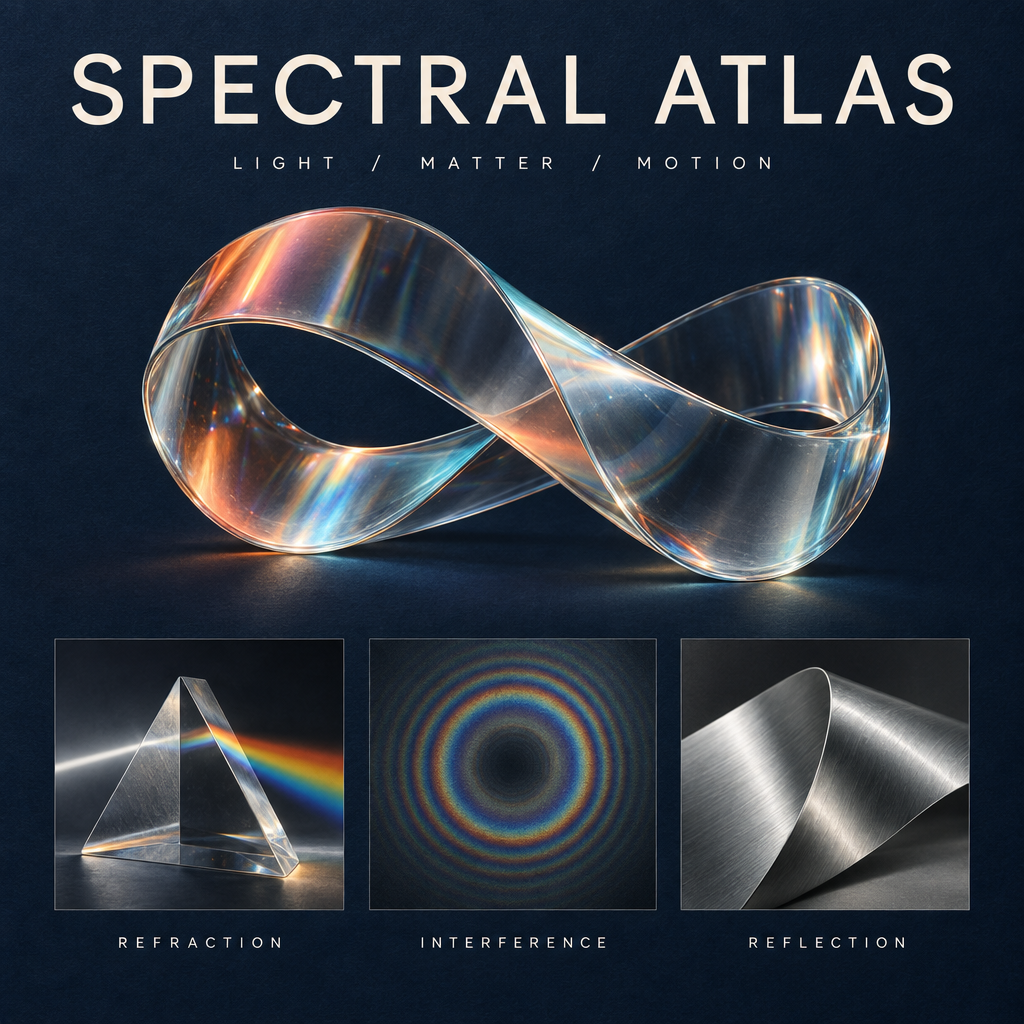
使用 GPT Image 2.5 生成 · 1K · High
實際生成提示詞
為方便重現,這裡保留實際使用的英文提示詞。下方創意建議已翻譯。
Design a collectible square museum exhibition poster titled SPECTRAL ATLAS. Deep ink-blue uncoated paper background with a very subtle tactile grain. At the top, set exactly SPECTRAL ATLAS in large ivory elegant modern grotesk letters with precise kerning; beneath it, exactly LIGHT / MATTER / MOTION in small widely spaced type. The central artwork is a luminous physically plausible glass ribbon folded into one continuous sculptural loop, refracting a restrained spectrum of coral, amber and icy cyan. Below the sculpture, place a perfectly aligned row of three small specimen panels: a detailed glass prism labeled REFRACTION, a fine concentric interference pattern labeled INTERFERENCE, and a brushed aluminium folded surface labeled REFLECTION. These three labels must be spelled exactly and clearly readable. Editorial Swiss-grid composition, generous margins, sharply resolved typography, sophisticated material rendering, subtle shadows and physically coherent highlights, premium contemporary science-museum identity. Only the five specified text strings and main title; no extra copy, no logos, no dates, no QR codes, no watermark. The image should feel like an art-directed design object, not a generic technology infographic.
更換標題,保留設計。
我們以 Sunburst 海報為原圖,僅要求將標題改為簡體中文「光谱图鉴」。比較雕塑、英文標籤與版面,查看哪些細節得以保留。
使用 GPT Image 2.5 生成 · 1K · High
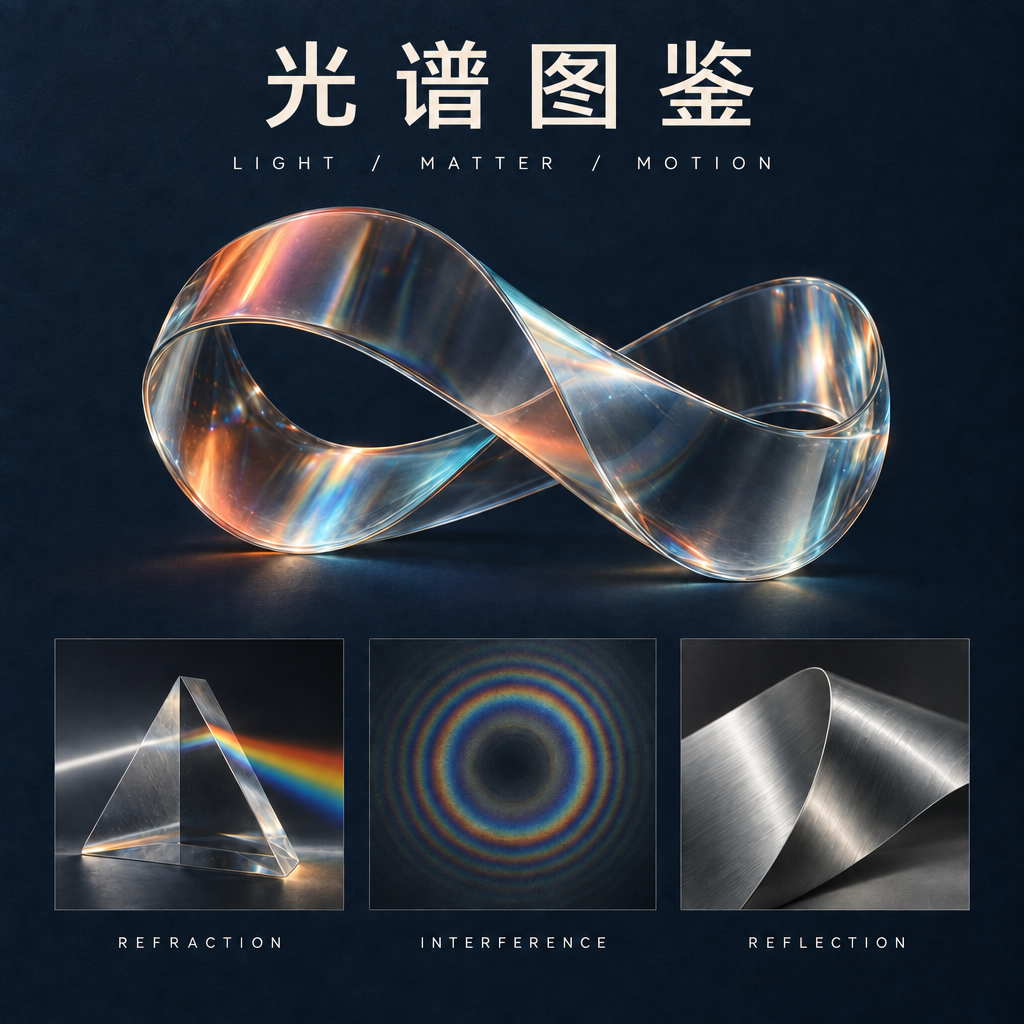
使用 GPT Image 2.5 生成 · 1K · High
實際生成提示詞
可將上方原圖用作編輯參考。 為方便重現,這裡保留實際使用的英文提示詞。下方創意建議已翻譯。
Make exactly one typography edit to this poster. Replace only the main headline SPECTRAL ATLAS with the four Chinese characters 光谱图鉴. Use clean, correctly formed Chinese characters with a refined modern typographic weight matching the original headline. Keep the headline in the same top title area and preserve optical balance. Do not change the subtitle LIGHT / MATTER / MOTION, the three English panel labels REFRACTION, INTERFERENCE, REFLECTION, the glass sculpture, its colors, highlights, specimen panels, paper texture, margins, or composition. Do not introduce any extra text or decoration. Preserve the square 1024 by 1024 layout.
GPT Image 2.5 Flare 還是 Sunburst?
OpenAI 推出了兩個 API 版本。依創作流程選擇起點,再以自己的參考圖測試。
快速探索
GPT Image 2.5 Flare
Flare 著重於更快的生成與日常創作反覆調整。需要嘗試多種視覺方向時,可以優先了解這個版本。
細緻修整
GPT Image 2.5 Sunburst
Sunburst 著重於細節豐富的創作與編輯,生成時間較長。若細微修改會影響最終構圖,可以考慮這個版本。
GPT Image 2.5 有哪些新變化?
參考圖還原
OpenAI 表示,新模型能更好地保留參考圖中的主體。自行測試時,請對照原圖檢查輪廓、識別特徵與光線。
定向編輯
此次發布強調修改指定元素,同時保留周圍細節。可以試著只替換一個物件,觀察相鄰物件是否維持原位。
連續修改的一致性
多輪影像編輯是此次發布的重點之一。每次指令請保持具體,並將每一步與原圖對照,而不只對照上一次結果。
三個值得嘗試的創意
這些是原創創作構想,並非經過驗證的 GPT Image 2.5 輸出。提示詞僅供起步,重複使用前請檢查每個結果。
同一個角色,全新的世界
從原創角色參考圖出發,將場景從安靜的天文台移到漂浮的植物太空站,同時維持角色辨識度。
創作提示詞
以我上傳的角色作為視覺基準。保留臉部、銀色短髮、琥珀色夾克、身體比例與四分之三側身姿勢。將角色置於黎明雲海上方漂浮的植物太空站。加入半透明溫室拱頂、懸垂植物根系與柔和的桃色光線。維持合理的接觸陰影。不要增加其他人物、標誌或文字。
只改變材質
上傳一件造型簡單的雕塑。比較紙質原版與釉面陶瓷編輯結果,觀察輪廓和細節的保留情況。
創作提示詞
僅修改參考圖中雕塑的材質:將摺紙變為手工施釉的青瓷。精確保留外輪廓、朝向、位置與拍攝角度。在摺痕處加入細微積釉與柔和的陶瓷光澤。保留原背景、底座及光線方向。不要添加物件,也不要重新設計雕塑。
海報修改不偏題
從自己的海報版面開始,只替換一個主標題,再檢查字距、拼字及其他設計元素是否維持不變。
創作提示詞
將我上傳海報的主標題替換為 TIDAL FUTURES,僅修改這一處。保留插畫、配色、紙張紋理、次要文字與邊界留白。將新標題放入原有標題區域,仔細處理視覺字距與閱讀順序。不要添加標誌或新文案。保留原始長寬比。
在工作台選擇可用模型,並上傳自己的參考圖。此操作不會送出生成任務。
從你已經喜歡的圖片繼續創作
選擇參考圖
使用自己擁有或獲准編輯的圖片。明確指出必須保持不變的臉部、形狀、文字或構圖。
提出一項清楚的修改
區分需要修改與需要保留的內容。例如:將光線改為黎明,維持相機位置、主體與背景物件不變。
確認結果,再繼續修改
檢查細節、文字與視覺連續性。嘗試下一個方向前,儲存滿意的結果及其提示詞。
GPT Image 2.5 常見問題
GPT Image 2.5 發布了嗎?
已發布。OpenAI 於 2026 年 9 月 8 日發布 ChatGPT Images 2.5,同時推出 API 版本 GPT Image 2.5 Flare 與 Sunburst。具體開放情況請查看官方公告。
現在能在 Ruxa 使用 GPT Image 2.5 嗎?
Ruxa 串接尚未驗證。本頁用於介紹模型,不代表已提供經確認的 GPT Image 2.5 生成服務。請進入工作台查看目前可用模型。
GPT Image 2.5 與 GPT Image 2 有何不同?
OpenAI 重點介紹了速度、參考圖還原、精準編輯與連續編輯一致性的提升。這些是供應商的說明,本頁並未提供 Ruxa 的獨立基準測試。
需要另外選擇 Edit 模型嗎?
影像編輯需要將原圖與修改要求一起提供。Ruxa 預定採用的流程是上傳參考圖或選取既有結果,再描述修改。實際編輯能力取決於工作台所選模型。
GPT Image 2.5 在 Ruxa 如何計費?
Ruxa 尚未確認 GPT Image 2.5 的價格。送出任何生成任務前,請檢查顯示的模型、設定與預估點數;其他模型的價格不能代表 2.5 的價格。
範例使用了哪些提示詞?
圖片比較所用的英文提示詞原文列於各自下方。另外三個創意構想是未經實測的起點。這些僅為單次樣本,不保證每次生成都能保留所有細節。
繼續探索
瀏覽其他影像模型指南與目前工作台的模型目錄。