
OPENAI · 图像模型指南
GPT Image 2.5
保留创意,细化每一处。
OpenAI 最新发布的图像模型着重于参考图还原与精准编辑。了解 Flare 和 Sunburst 分别适合怎样的创作项目。
比较两个版本官方公告 · 2026 年 9 月 8 日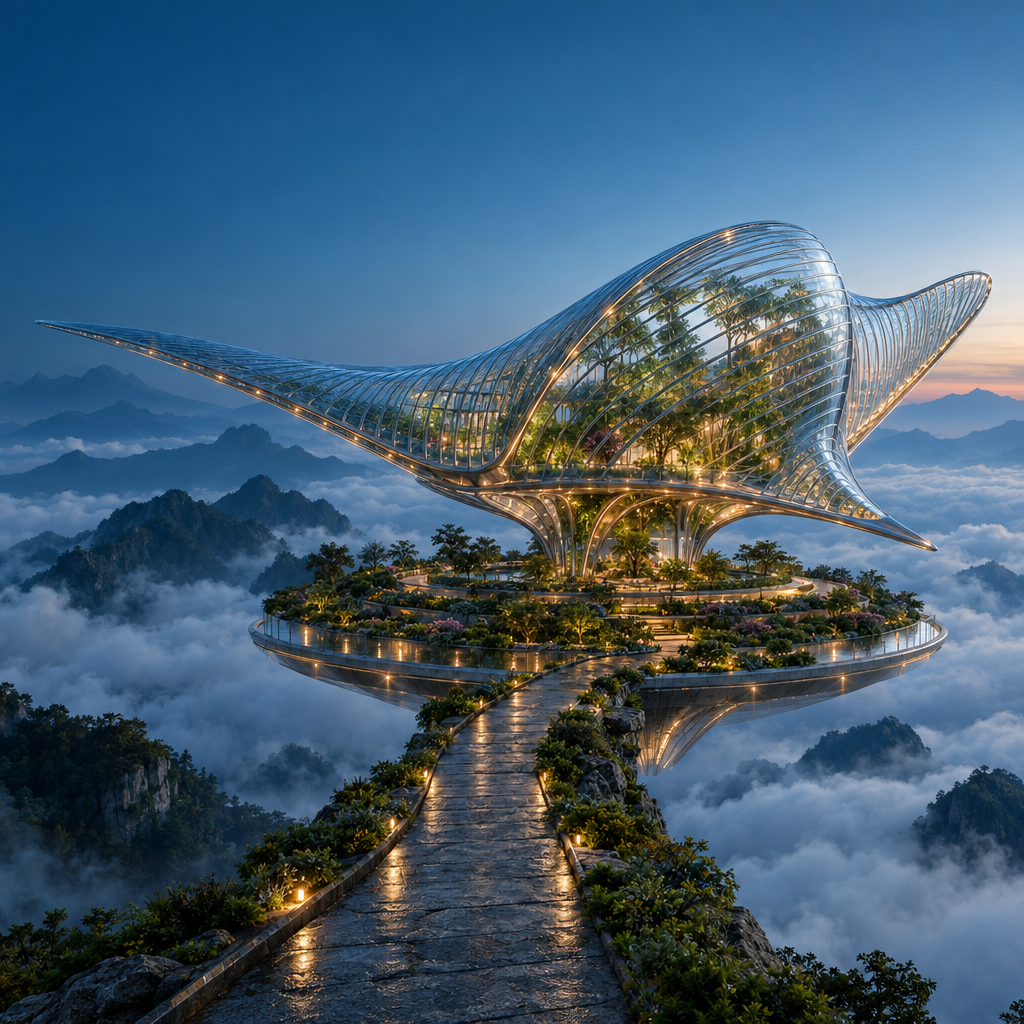
实际生成提示词
Create a spectacular cinematic architectural photograph of an imaginary floating botanical observatory at blue hour. A single enormous manta-ray-shaped pavilion made from clear ribbed glass and slender polished titanium floats above a circular terraced garden in a sea of clouds. The glass fins curve gracefully, with botanicals visible inside and small warm amber lights following the structural ribs. A narrow stone causeway approaches from the lower foreground; layered mountain silhouettes recede into mist. Precise architectural geometry, believable glass refraction, damp stone microtexture, atmospheric depth and carefully restrained teal-and-amber color grading. Low three-quarter wide-angle view, one unmistakable focal point, ambitious editorial art direction, grand scale, crisp but natural detail. Keep the upper-left corner visually quiet for potential website text. Square composition. No people, no text, no logos, no collage, no split screen, no visible watermark.
本页为模型指南。GPT Image 2.5 在 Ruxa 的生成能力与价格尚未验证。工作台按钮会打开当前可用的模型选择。
看看提示词如何变成作品
这些原创图片使用 GPT Image 2.5 生成,分辨率为 1024 × 1024,质量设为 High。查看完整图片与实际使用的提示词。
同一份创作要求,两种诠释。
Flare 与 Sunburst 使用了相同的海报提示词、分辨率和质量设置。可以比较文字、间距与玻璃反射。这些单次输出用于展示差异,不代表模型的整体排名。
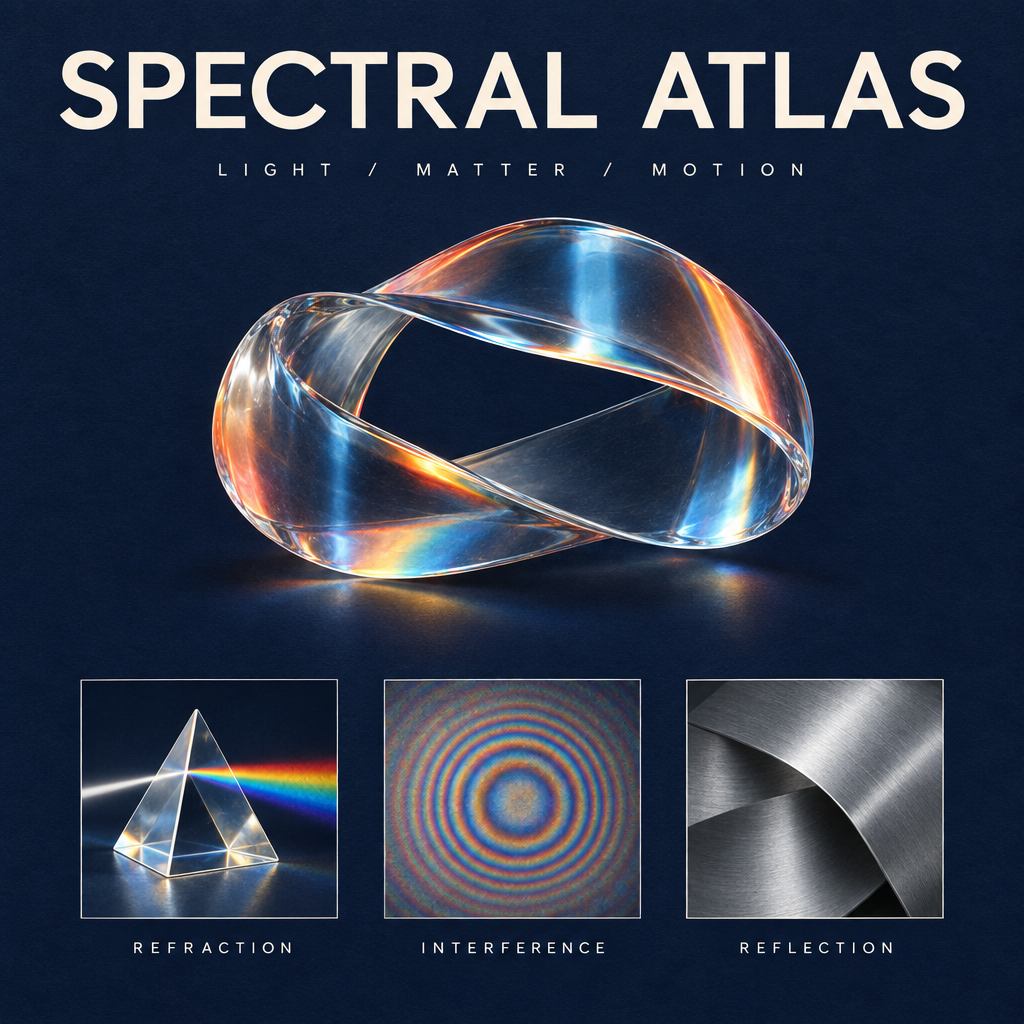
使用 GPT Image 2.5 生成 · 1K · High
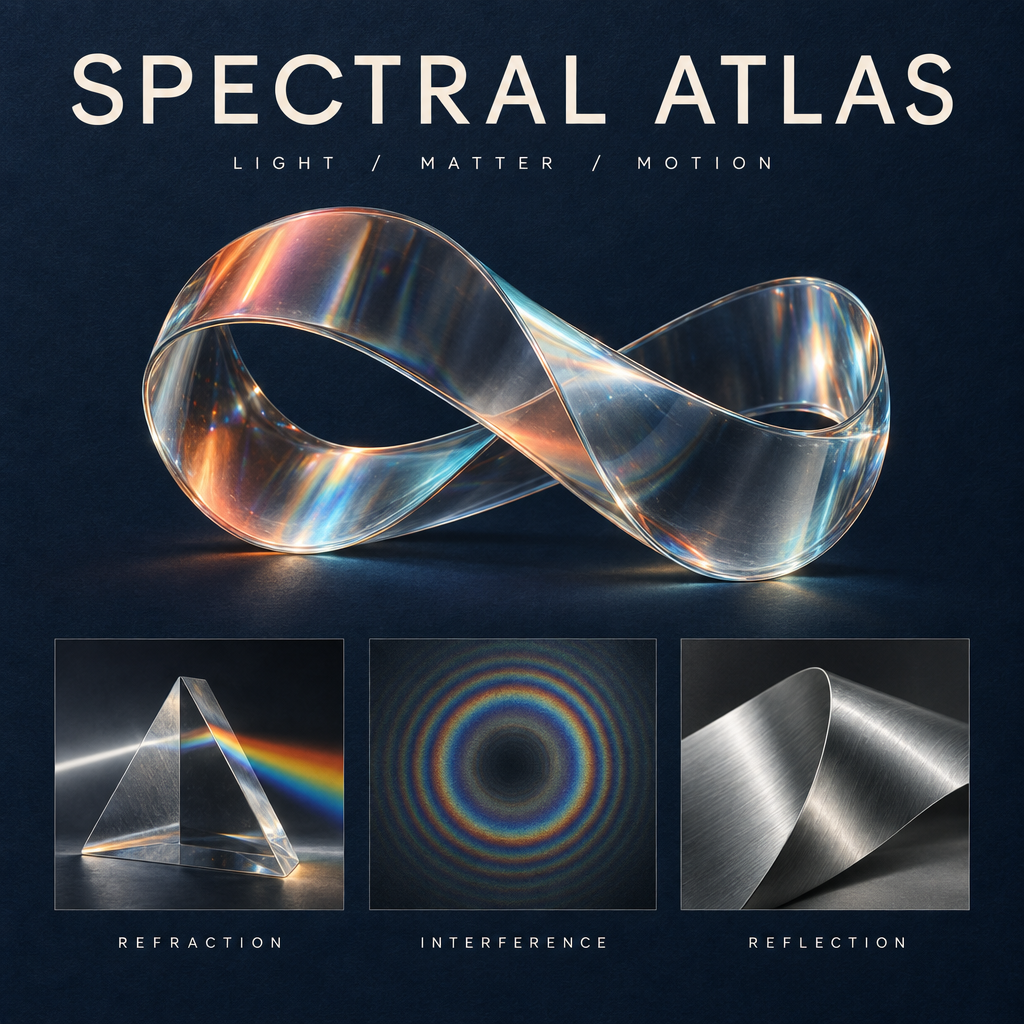
使用 GPT Image 2.5 生成 · 1K · High
实际生成提示词
保留实际使用的英文提示词,方便你复用同样的指令。
Design a collectible square museum exhibition poster titled SPECTRAL ATLAS. Deep ink-blue uncoated paper background with a very subtle tactile grain. At the top, set exactly SPECTRAL ATLAS in large ivory elegant modern grotesk letters with precise kerning; beneath it, exactly LIGHT / MATTER / MOTION in small widely spaced type. The central artwork is a luminous physically plausible glass ribbon folded into one continuous sculptural loop, refracting a restrained spectrum of coral, amber and icy cyan. Below the sculpture, place a perfectly aligned row of three small specimen panels: a detailed glass prism labeled REFRACTION, a fine concentric interference pattern labeled INTERFERENCE, and a brushed aluminium folded surface labeled REFLECTION. These three labels must be spelled exactly and clearly readable. Editorial Swiss-grid composition, generous margins, sharply resolved typography, sophisticated material rendering, subtle shadows and physically coherent highlights, premium contemporary science-museum identity. Only the five specified text strings and main title; no extra copy, no logos, no dates, no QR codes, no watermark. The image should feel like an art-directed design object, not a generic technology infographic.
更换标题,保留设计。
我们以 Sunburst 海报为原图,仅要求将标题改为中文“光谱图鉴”。对比雕塑、英文标签和版式,查看哪些细节得以保留。
使用 GPT Image 2.5 生成 · 1K · High
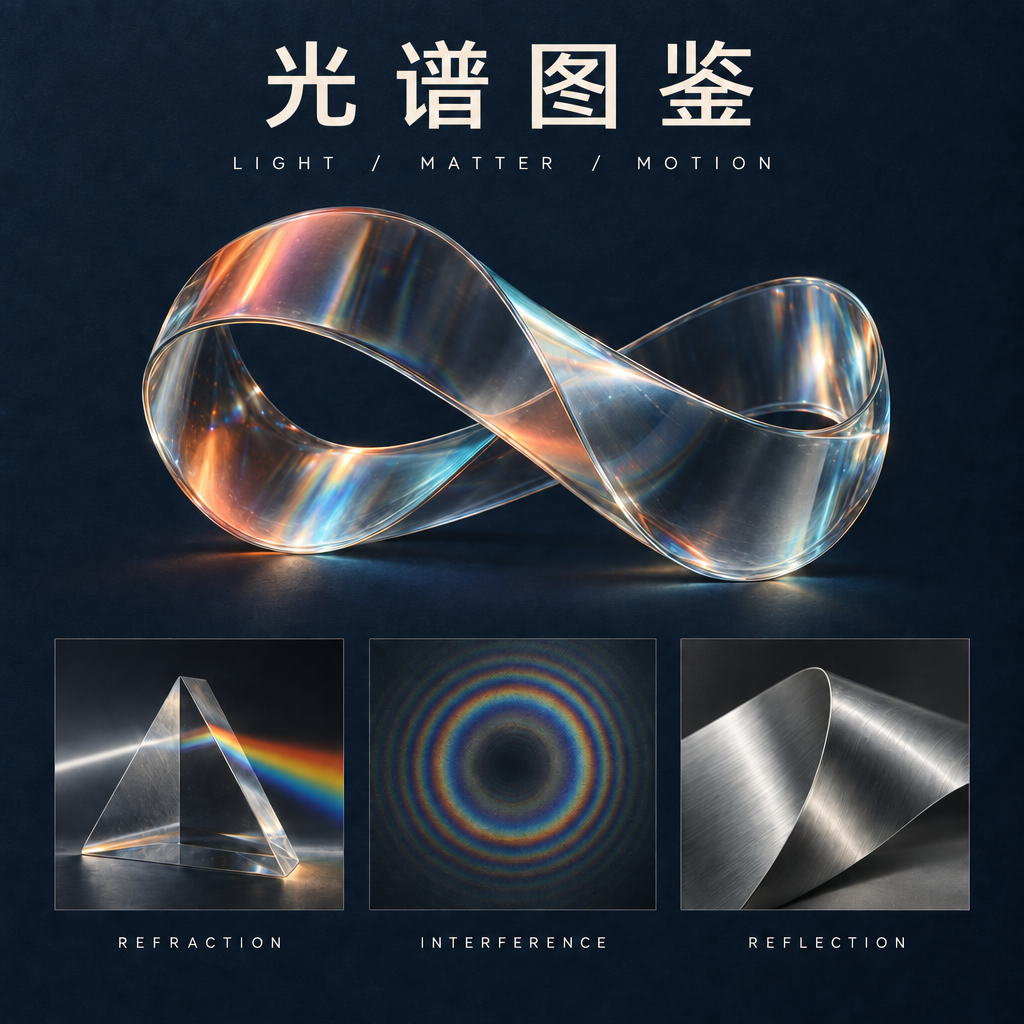
使用 GPT Image 2.5 生成 · 1K · High
实际生成提示词
可以将上方原图用作编辑参考。 保留实际使用的英文提示词,方便你复用同样的指令。
Make exactly one typography edit to this poster. Replace only the main headline SPECTRAL ATLAS with the four Chinese characters 光谱图鉴. Use clean, correctly formed Chinese characters with a refined modern typographic weight matching the original headline. Keep the headline in the same top title area and preserve optical balance. Do not change the subtitle LIGHT / MATTER / MOTION, the three English panel labels REFRACTION, INTERFERENCE, REFLECTION, the glass sculpture, its colors, highlights, specimen panels, paper texture, margins, or composition. Do not introduce any extra text or decoration. Preserve the square 1024 by 1024 layout.
GPT Image 2.5 Flare 还是 Sunburst?
OpenAI 发布了两个 API 版本。根据创作流程选择起点,再用自己的参考图进行测试。
快速探索
GPT Image 2.5 Flare
Flare 面向更快的生成与日常创作迭代。需要尝试多种视觉方向时,可以优先了解这个版本。
精细打磨
GPT Image 2.5 Sunburst
Sunburst 面向细节丰富的创作与编辑,生成耗时更长。如果微小改动会影响最终构图,可以考虑这个版本。
GPT Image 2.5 有哪些新变化?
参考图还原
OpenAI 表示,新模型能更好地保留参考图中的主体。自行测试时,请对照原图检查轮廓、标志性细节与光线。
定向编辑
此次发布强调修改指定元素,同时保留周围细节。可以尝试只替换一个物体,观察相邻物体是否保持原位。
连续修改的一致性
多轮图像编辑是此次发布的重点之一。每次指令保持具体,并将每一步与原图对照,而不只对照上一次结果。
三种编辑,从原图看到结果
将 GPT Image 2.5 Sunburst 的实际编辑结果与原图比较。实际提示词展示了如何分别说明要修改的内容与需要保留的细节。
同一个角色,全新的世界
银发、穿琥珀色夹克的角色从天文台来到漂浮植物空间站。对照原图比较面部、姿势与服装。
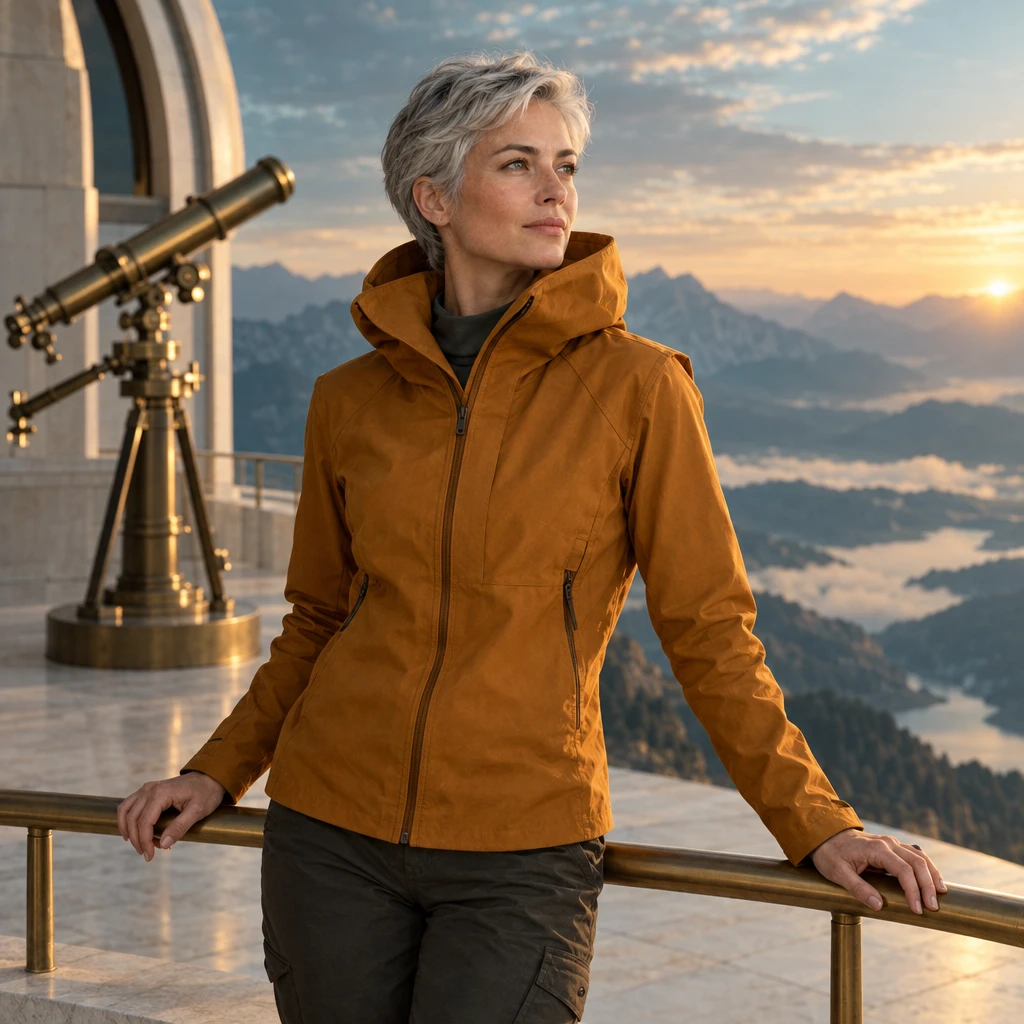
原图
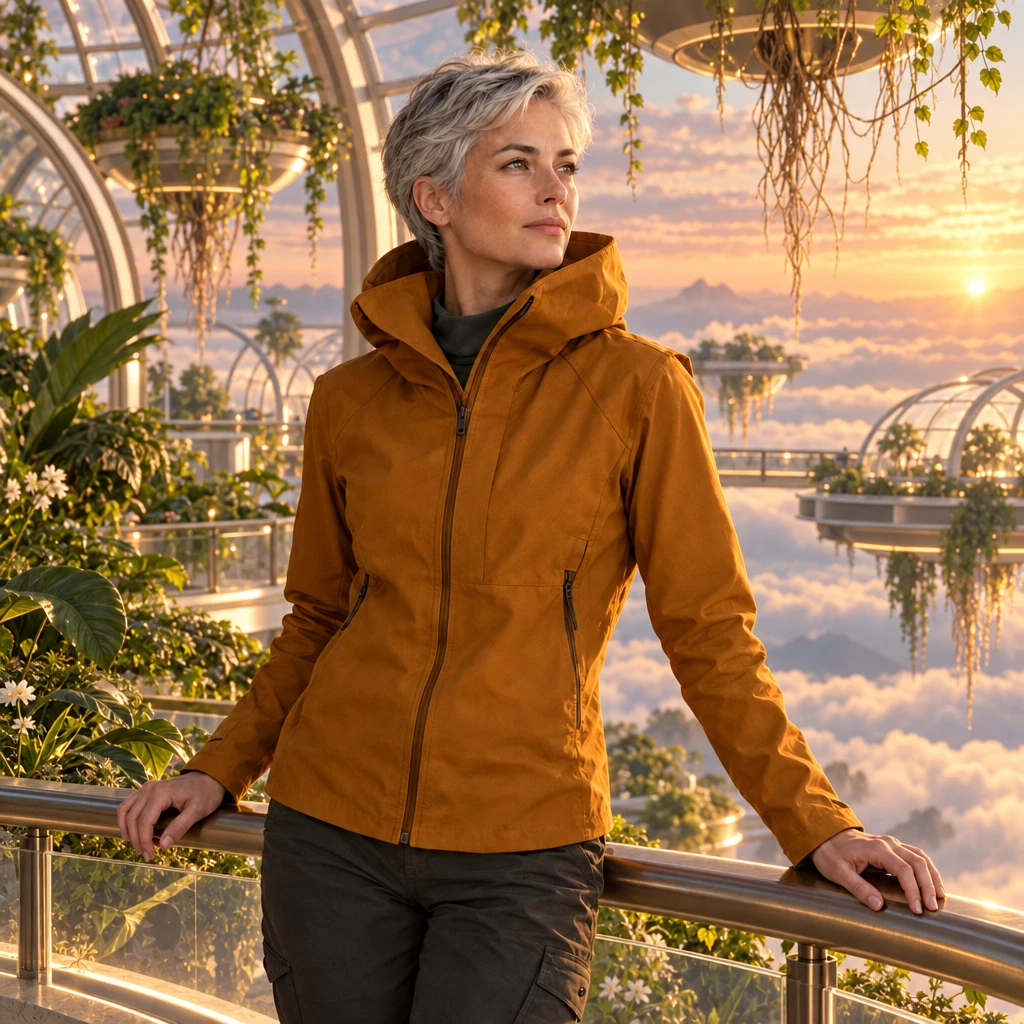
使用 GPT Image 2.5 生成 · 1K · High
实际编辑提示词
Use my uploaded character as the visual anchor. Preserve the face, short silver hair, amber jacket, body proportions and three-quarter pose. Place the character on a floating botanical station above a cloud sea at dawn. Add translucent greenhouse arches, suspended roots and soft peach light. Maintain a coherent contact shadow. No additional people, logos or text.
只改变材质
折纸锦鲤变为釉面青瓷。对照原图比较轮廓、折痕、底座与光线。
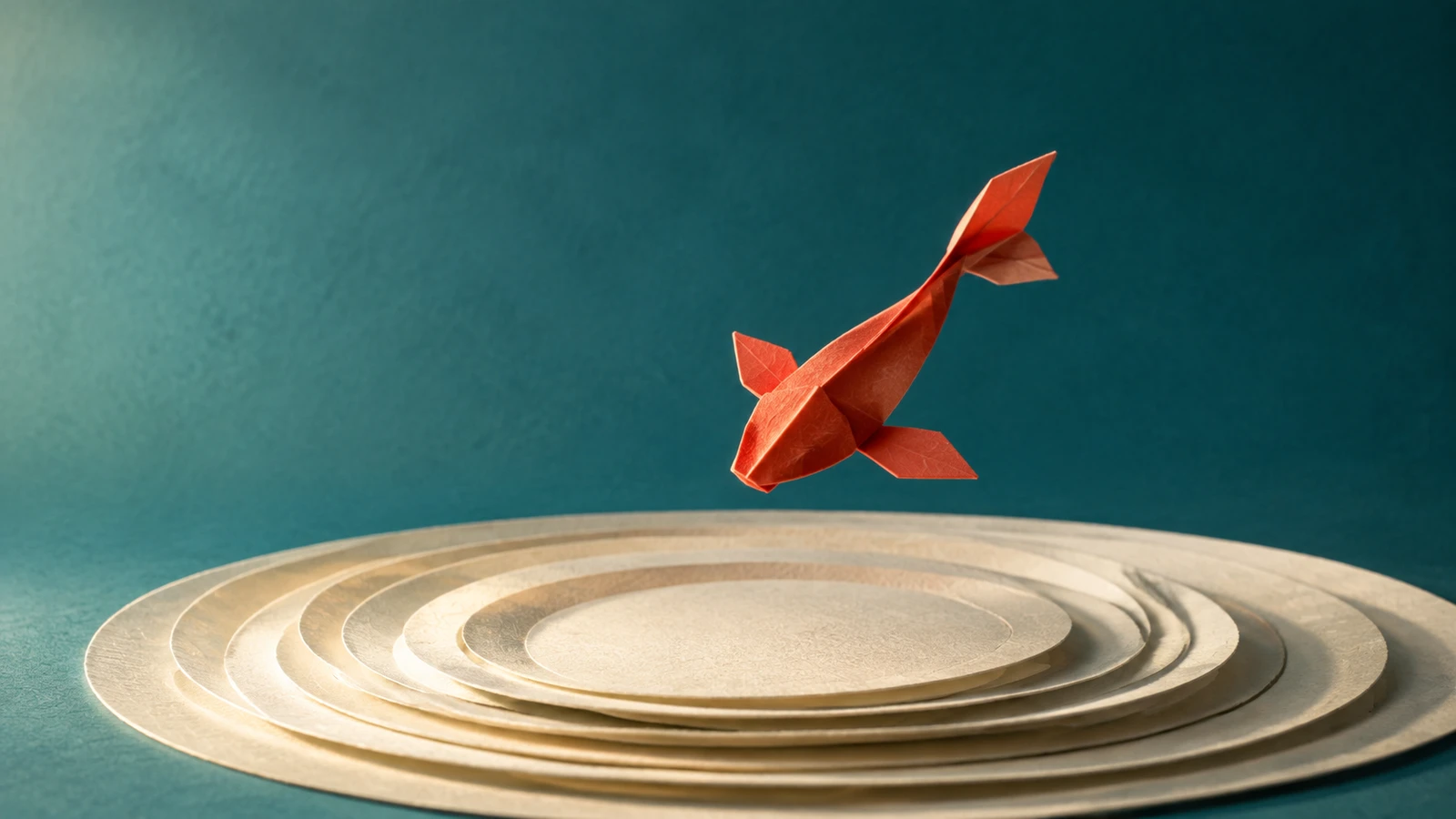
原图
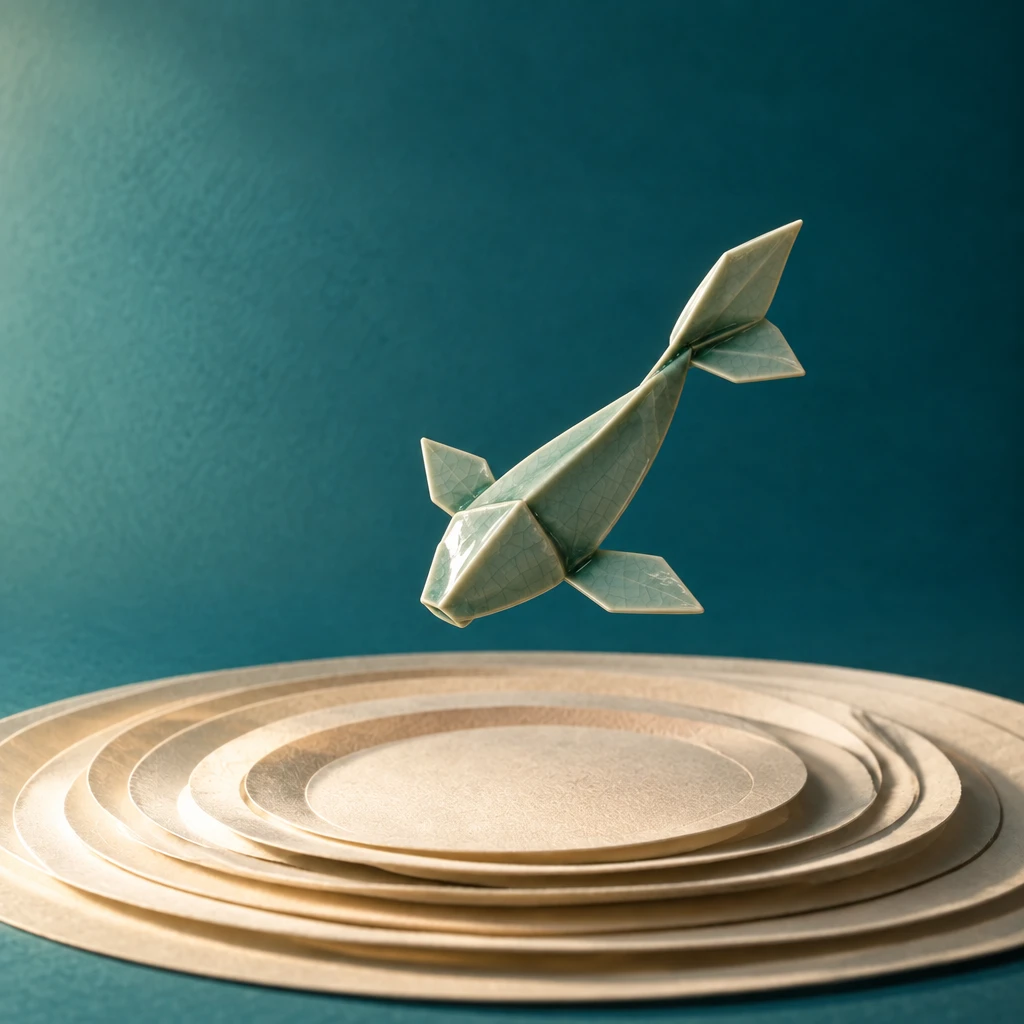
使用 GPT Image 2.5 生成 · 1K · High
实际编辑提示词
Edit only the material of the sculpture in my reference: transform folded paper into hand-glazed celadon ceramic. Preserve the exact outer silhouette, orientation, placement and camera angle. Add subtle glaze pooling around folds and a soft ceramic sheen. Keep the original backdrop, pedestal and lighting direction. Do not add objects or redesign the sculpture.
海报修改不偏题
标题改为 TIDAL FUTURES。对照原海报比较文字、间距与未修改的插画。
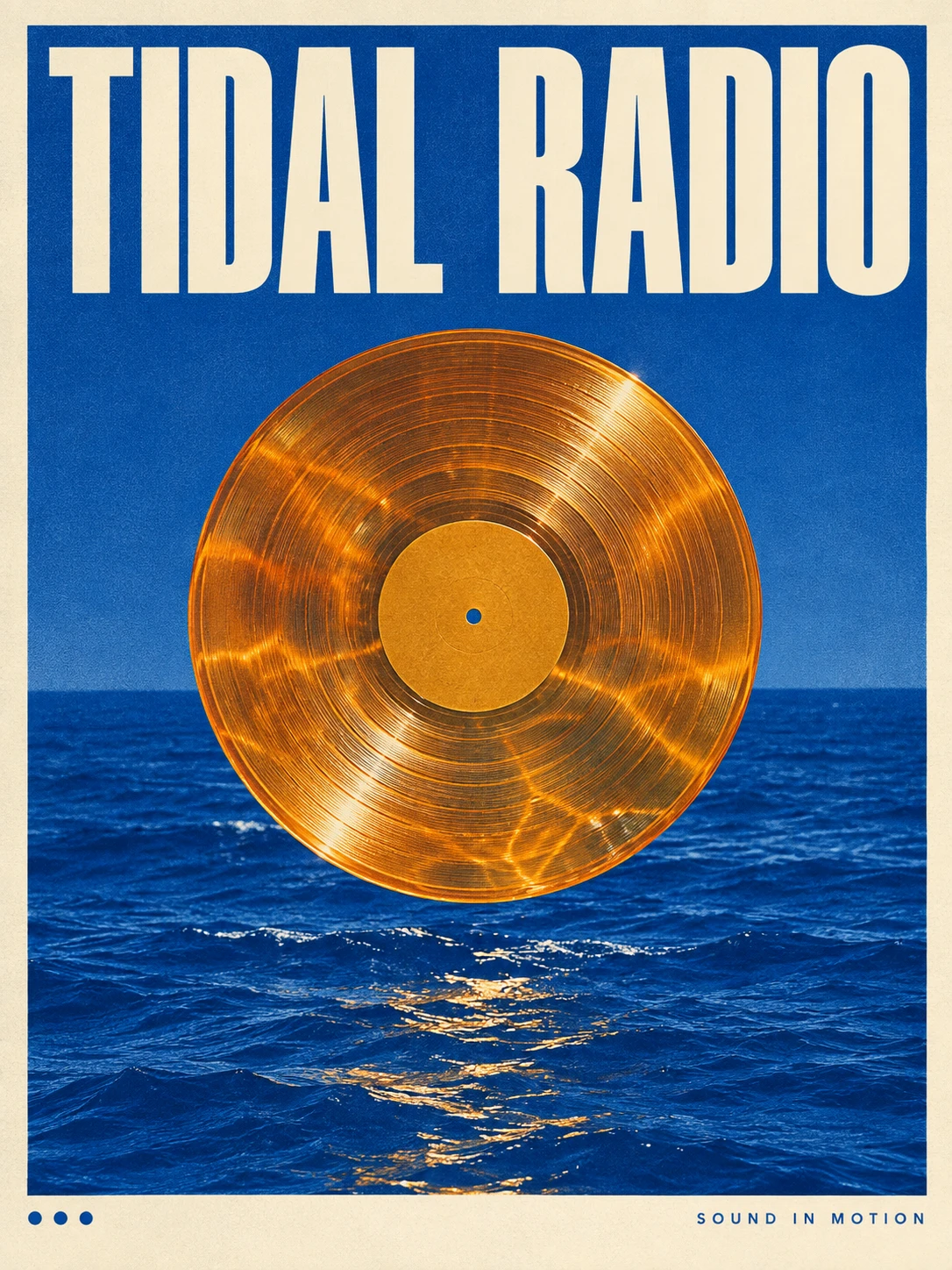
原图
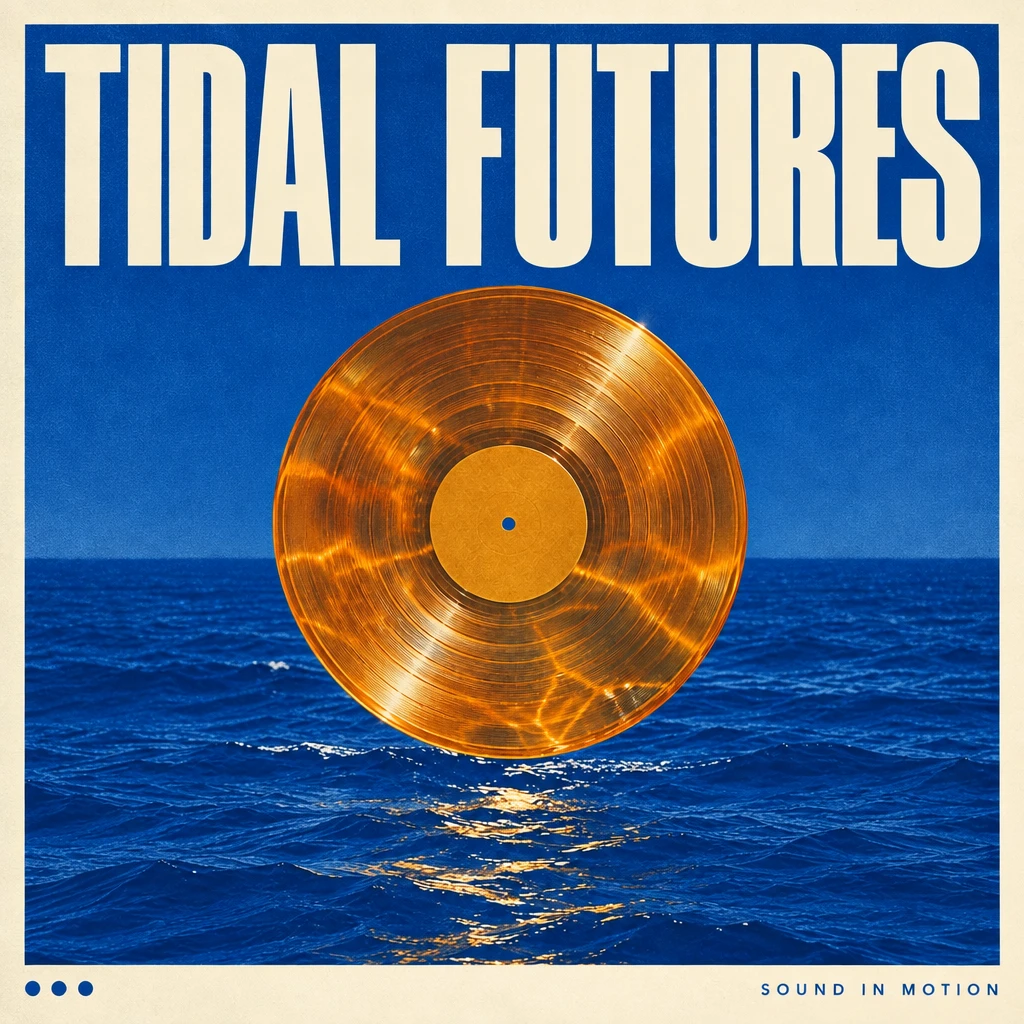
使用 GPT Image 2.5 生成 · 1K · High
实际编辑提示词
In my uploaded poster, replace only the main headline with TIDAL FUTURES. Keep the illustration, palette, paper texture, secondary text and margins unchanged. Fit the new headline into the existing title area with deliberate optical spacing and a clear reading order. Do not add a logo or new copy. Preserve the original aspect ratio.
打开原图,然后在工作台选择可用的编辑模型并附上参考图。复制提示词不会提交生成任务。
从你已经喜欢的图片继续创作
选择参考图
使用自己拥有或有权编辑的图片。明确必须保持不变的人脸、形状、文字或构图。
提出一项清晰的修改
区分需要修改与需要保留的内容。例如:把光线改为黎明,保持相机位置、主体与背景物体不变。
确认结果,再继续修改
检查细节、文字和视觉连续性。尝试下一个方向前,保存认可的结果及其提示词。
GPT Image 2.5 常见问题
GPT Image 2.5 发布了吗?
已发布。OpenAI 于 2026 年 9 月 8 日发布 ChatGPT Images 2.5,同时推出 API 版本 GPT Image 2.5 Flare 和 Sunburst。具体开放情况请查看官方公告。
现在能在 Ruxa 使用 GPT Image 2.5 吗?
Ruxa 接入尚未验证。本页用于介绍模型,不代表已提供经过确认的 GPT Image 2.5 生成服务。请进入工作台查看当前可用模型。
GPT Image 2.5 与 GPT Image 2 有什么区别?
OpenAI 重点介绍了速度、参考图还原、精准编辑和连续编辑一致性的提升。这些属于供应商的说明,本页并未提供 Ruxa 的独立基准测试。
需要单独选择 Edit 模型吗?
图像编辑需要把原图与修改要求一起提供。Ruxa 计划采用的流程是上传参考图或选中已有结果,然后描述修改。实际编辑能力取决于工作台所选模型。
GPT Image 2.5 在 Ruxa 怎么收费?
Ruxa 尚未确认 GPT Image 2.5 的价格。提交任何生成任务前,请检查显示的模型、参数与预计积分;其他模型的价格不能代表 2.5 的价格。
示例使用了哪些提示词?
每个示例都附有生成该结果时实际使用的英文提示词。编辑示例还附有原图。这些单次输出用于展示指令效果,不保证每次生成都能保留所有细节。
继续探索
了解其他图像模型指南与当前工作台模型目录。